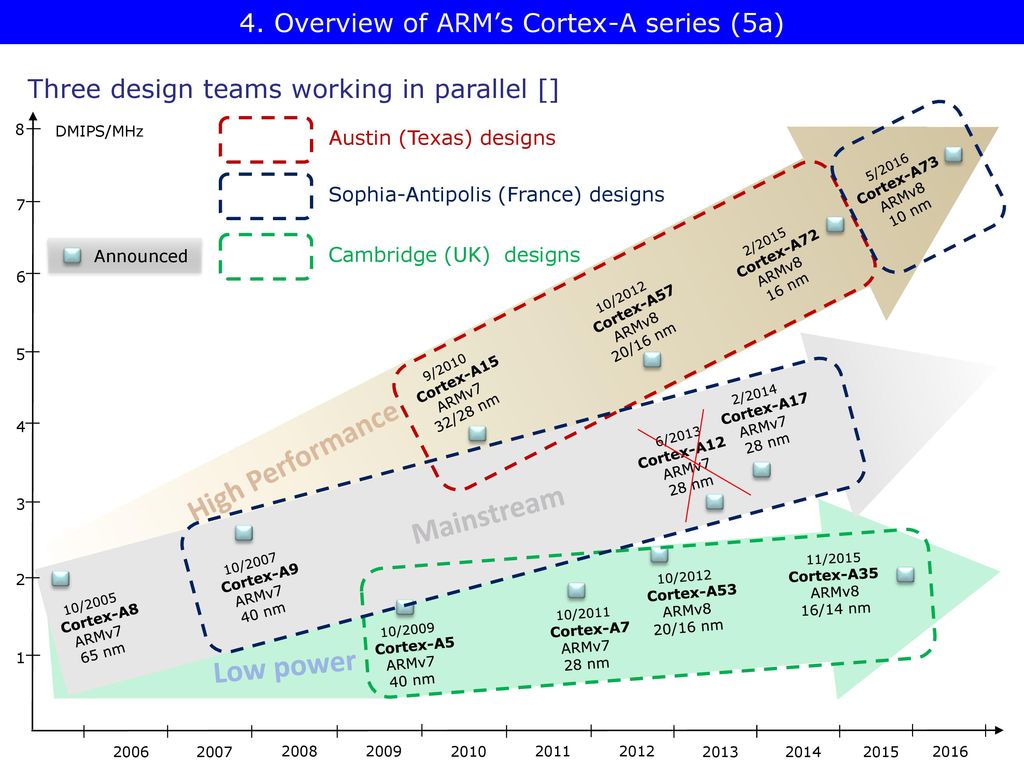
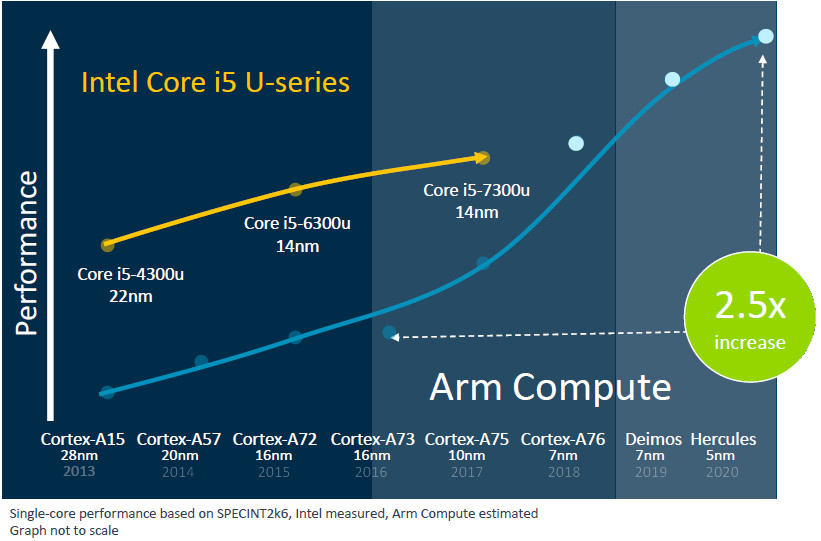
ARM hardware has come in various generations. The oldest that you can still use with BOINC is ARMv5, and that only with radioactiveathome.
You can find ARMv5tel (ARMv5TE little-endian) devices in older, low-power embedded systems, primarily featuring Marvell Orion/Kirkwood processors, such as e.g. the Sheevaplug, QNAP TS-109/209/409, Linksys NSLU2, and Buffalo Linkstation. These devices, popular in the late 2000s and early 2010s, often served as NAS or DIY servers, though mainstream support has largely ended.
The audience here is probably more familiar with the successor to ARMv5, unsurprisingly called ARMv6. There was ARMv6el (soft float/little endian) and ARMv6hf (hardware floating point, improving performance in BOINC considerably). A well-known example is the Broadcom BCM2835, found in the single-core Raspberry Pi models, such as the original Raspberry Pi Model A and B variants, but also in the Raspberry Pi Model A+, B+, the original Compute module and the Raspberry Pi Zero.
Armv6 was -even more unsurprisingly- followed by the yet more capable ARMv7. A short-lived example of this is the ARM-Cortex-A7 based Broadcom BCM2836, found solely in the first quad-core Raspberry Pi B model 2 (v1.1), because the v1.2 already had the yet more advanced BCM2837, with underlying ARMv8 architecture. But there were more ARMv7 SOCs that lived far longer, such as e.g. the Cortex-A8 in the Sitara AM3358 of the BeagleBone Black, or the Cortex-A5 in the Amlogic S805 of the Odroid C1.
To put things in perspective
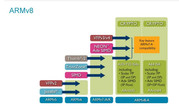
Click on the picture to see it in a bigger format.
Now while the various architectures had up to now shown very little differences within, this changed with ARMv8. In fact there are ARMv8.0-A, ARMv8.1-A, ARMv8.2-A, ARMv8.3-A, ARMv8.4-A, ARMv8.5-A, ARMv8.6-A, ARMv8.7-A, ARMv8.8-A and ARMv8.9-A SOCs. There are also ARMv8-M (for microcontrollers) and ARMv8-R (real-time designs) profiles.
Now when the support for ARMv5 is virtually non-existent in BOINC (except for radioactiveathome) and the amount of work that can be done with ARMv6 is dwindling away too, ARMv7-based apps are still alive and kicking. A good example is
SiDock@Home, all three applications mention
Linux running on ARM, hardware FP. If you want real performance for these apps you need either an ARMv7 based SOC featuring the ARMv7 Cortex-A15 or Cortex-A17, or you can choose to let your ARMv8-based SBCs to run a 32 bit OS. This however is only a valid solution when you solely concentrate on ARMv7-based apps from BOINC projects. If you want an ARMv8-based system to be able to run both ARMv7- and ARMv8-based apps you can do the following:
Code: Select all
sudo dpkg --add-architecture armhf
sudo apt update --fix-missing
sudo apt install libc6:armhf libstdc++6:armhf zlib1g:armhf libfuse2:armhf libgomp1:armhf libboinc7:armhf
sudo apt full-upgrade
and add this to your cc_config.xml in /var/lib/boinc-client (or /var/lib/boinc, depending on your distro and/or distro version)
Code: Select all
<cc_config>
    <options>
        <alt_platform>arm-unknown-linux-gnueabihf</alt_platform>
        <alt_platform>armv7l-unknown-linux-gnueabihf</alt_platform>
    </options>
</cc_config>
Now if you also happen to run the BOINC project iThena.Measurements, you might now get errors when running their ARMv7-based CNode-app. Especially when you e.g. live in the Netherlands, run an UK English BOINC and use a US international keyboard (with the Euro on 5). iTHena can't handle that (and other project apps perhaps as well).
How to cure this?
edit
/lib/systemd/system/boinc-client.service to include the Environment parameter
Environment=LC_ALL=C (as the error points to locales).
Code: Select all
[Unit]
Description=Berkeley Open Infrastructure Network Computing Client
Documentation=man:boinc(1)
After=network-online.target

[Service]
*Added line to test whether inclusion of the Environment parameter helps
Environment=LC_ALL=C
ProtectHome=true
Type=simple
Nice=10
User=boinc
WorkingDirectory=/var/lib/boinc
ExecStart=/usr/bin/boinc
ExecStop=/usr/bin/boinccmd --quit
ExecReload=/usr/bin/boinccmd --read_cc_config
ExecStopPost=/bin/rm -f lockfile
IOSchedulingClass=idle
With these modifications my Rock Pi 4B+ and my Odroid-N2+, both 4GB hexa-core systems managed to have top scores at SiDock@Home for me. In fact it was the only project where the Rock Pi 4B+ did anything really useful, both Science and BOINC credits-wise (The Odroid-N2+ was very good in WEP-M+2 too).
But for everyday purposes, my oldest ARMv8 systems (ARMv8.0-A with less than 1GB RAM per core) now seem to be lacking in capabilities.
What to replace them with?
Jetson Nano 2GB Dev Kit -> Jetson Orin Nano 8GB Super Dev Kit (ARMv8.2-A)
- Pros: More cores (6 compared to 4), more performance, More RAM per core (1.5GB compared to 0.5GB), lesser wattage (the Jetson Nano 2GB has been overclocked to 2000 MHz, running at some 10 Watts....)
- Cons: The price, the Orin Nano 8GB Super Dev Kit costs at least 309 Euros.
Odroid-N2+ 4GB -> Odroid-M2 16 GB (ARMv8.2-A)
- Pros: More cores (8 compared to 6), more performance, More RAM per core (1 or 2GB compared to 0.67GB)
- Cons: The price, when ordering through Odroid.nl (which is a UK company) the 8GB model costs 159.30 Euros (excluding VAT, handling and postage), the 16GB model costs 212.40 Euros (again excluding VAT, handling and postage). When bought in the Netherlands the 16GB model is €241.94, which might be cheaper in the end.
Rock Pi 4B+ 4GB -> Now here it gets interesting. A new 8GB or 16GB version of the octa-core
Radxa Rock Pi 4D would take care of the RAM-based problems, but it would still be an ARMv8.0-A based system, no improvement there. Radxa also happens to have a new
Radxa Dragon Q6A SBC, based upon a Qualcomm Dragonwing™ QCS6490, which is ARMv8.4-A* based and the 12GB and 16GB versions of it seem more than adequate for some time to come.
- Dragon pros: More cores (8 compared to 6), more performance, More RAM per core (1, 1.5 or 2GB compared to 0.67GB)
- The price is the selling point for the Dragon: the 8GB model costed 70 Euros until they changed it -during my writing this(!)- to 99 Euros, the 12Gb model 120 Euros and the 16GB model is presently not for sale.
* According to well-known SBC expert Thomas Kaiser the ARMv8.4-A for the Qualcomm QCS6490 Dragonwing is pure marketing (if so, even supported by
Wikipedia), and he has
some pretty convincing arguments...